Providers
A provider is a company whose tracking system sends vehicle positions to IFMS. The Providers screen is the catalogue of those companies, with one vehicle count per provider. The count includes only legal vehicles.
Nobody can add, rename, change or remove a provider in the portal.
Providers appear by themselves
Nobody creates a provider here. A provider is created the first time its system successfully sends data to IFMS, using the identity the IFMS gateway gives it, and it is marked Active from that moment. Its name also comes from its own connection: if the provider later sends a different display name, the name in this list changes with it.
Companies that want to start sending data follow the public developer guide at https://ifms-developer.kairosinnovations.dev. Point a provider there rather than trying to set anything up in the portal.
Unnamed providers
A provider that started sending data before its system gave IFMS a display name shows as "Unnamed provider (code)", with an outlined Unnamed badge beside it. It is named as soon as its own system sends a name; nobody can name it in the portal.
Until then, an unnamed provider is left out of the GPS provider list on Alert routing and the provider list in the Alert Policies wizard. It still appears in the provider filter on Fleet, under the same "Unnamed provider (code)" label.
Who can see this screen
Anyone whose role allows them to see providers: Operator, Supervisor, Operational manager and System admin. If your role does not include it, Providers is missing from the sidebar. See What each role can do.
How to open it
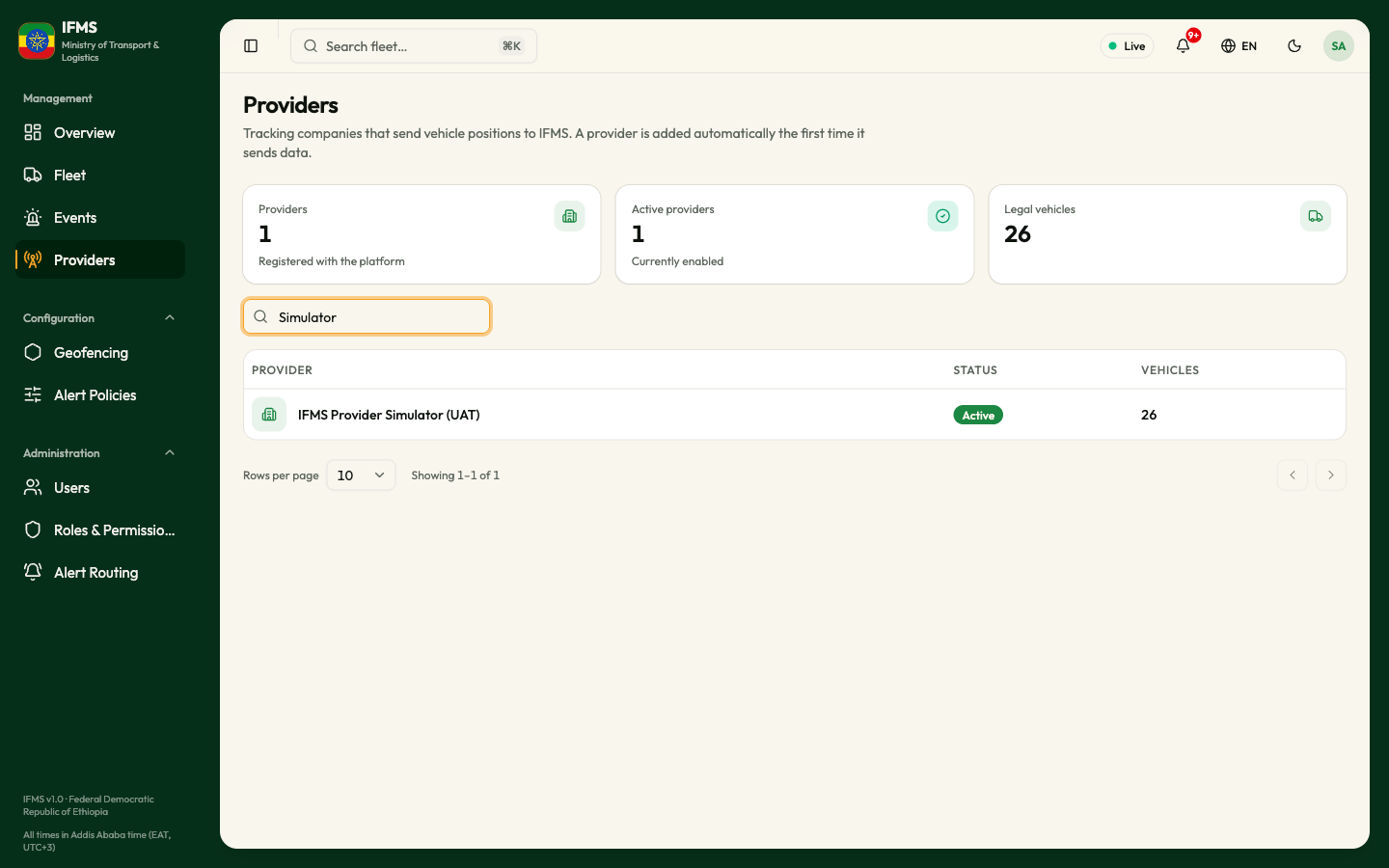
- In the sidebar, under Management, select Providers.
Counts

The vehicle counts include only vehicles IFTMS says are legal. Refused positions do not add vehicles to these counts.
Searching
Type in the box marked Search providers…. It matches the provider's name and its code, and starts on its own shortly after you stop typing.
The table
| Column | What it shows |
|---|---|
| PROVIDER | The provider's name. An unnamed provider shows as "Unnamed provider (code)" with the Unnamed badge. |
| STATUS | Active or Inactive. |
| VEHICLES | How many of this provider's vehicles are currently legal. |
- Selecting a row opens that provider: Provider details.
- The order is fixed: the most recently created provider first. Columns cannot be sorted, and there are no filters.
- Under the table are the usual Rows per page selector (10, 20, 50, 100), the "Showing 1–9 of 9" line and the page arrows.
When the screen is empty or fails
| What you see | What it means | What to do |
|---|---|---|
| Grey placeholder rows | The list is loading. | Wait a moment. |
| Cards showing 0 while rows are listed | The counts are still loading. | Wait a moment. |
| "No providers found" / "Try a different search." | Nothing matches what you typed. | Clear the search box. |
| "This list could not be loaded" with a Try again button | The request failed. Nothing is missing. | Select Try again; if it keeps failing, tell your administrator. |
Tips
A provider's vehicle count falls when one of its vehicles stops being legal. Check Events for the legality alert. For reporting problems, check Oldest report and Reporting on Provider details.